Dzine AI视频生成器
Dzine 成立于 2023 年(美国),并于 2024 年完成了从 Stylar AI 到 Dzine 的品牌演变。其以工作流程为中心的引擎可确保逐帧一致性,让创作者能够将原始素材重新制作成高保真资产,同时不损失运动完整性。Dzine AI 将生成能力与精细编辑相结合,实现真正的电影级连贯性。但是,如果您发现将短片、风格化的剪辑组合成连贯的营销信息过于耗时, TikTV AI可以一次性提供完整、可发布的视频。立即试用TikTV AI !
Key Features of Dzine
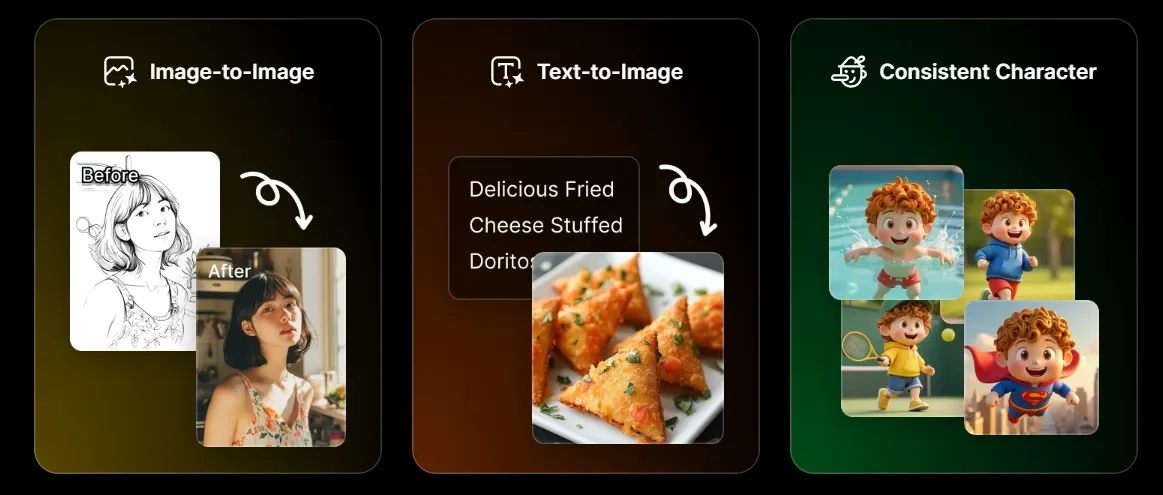
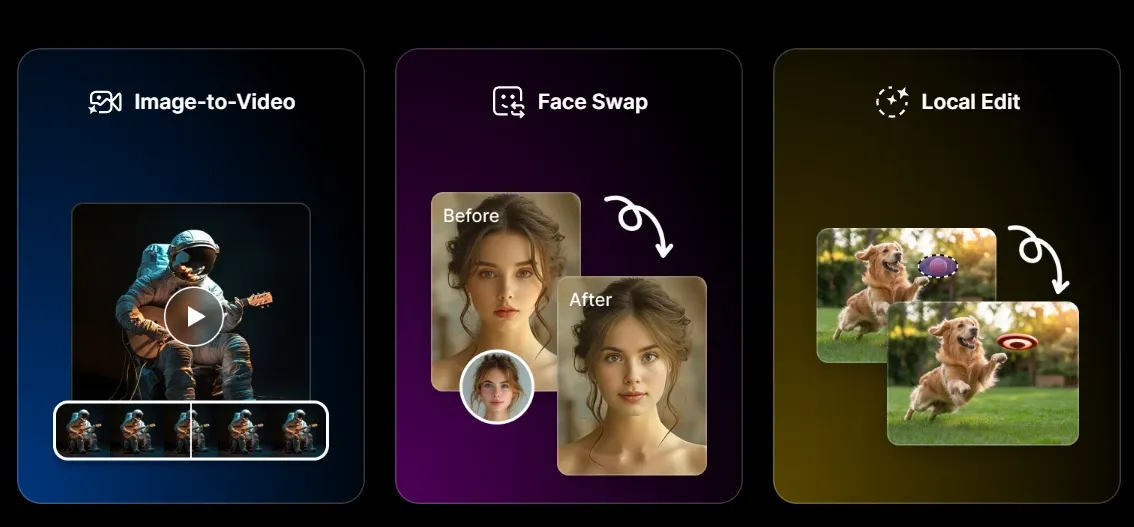
AI Video Style Transfer: Instantly transform existing footage into 20+ high-end artistic styles.Character Consistency Lock: Maintain the same face and outfit across 100% of your project frames.Generative Fill & Inpainting: Seamlessly add or change objects in your video frames with 'Inpainting.'AI Face Swap: High-fidelity facial replacement for localized marketing or personalized content.Canvas Outpainting: Expand the background of any asset to fit 16:9 or 9:16 layouts perfectly.Background Remover: One-click isolation of subjects to create 'floating' assets for social overlays.Sketch-to-Image/Video: Convert rough hand-drawn doodles into polished, realistic commercial visuals.Multi-Model Logic Integration: Orchestrates top-tier architectures like Flux and Stable Diffusion.
1. AI Video Style Transfer
Dzine AI distinguishes itself with a 'Style Transfer' engine that is arguably the most stable in the current market. Instead of getting 'jittery' AI artifacts, users can take a raw mobile recording and reskin it into 3D animation, claymation, or cyberpunk aesthetics. It allows creators to produce high-budget looks without a massive VFX team, making it a favorite for music video directors.
2. Character Consistency Lock
The biggest 'pain point' in AI video is the 'melting face' problem. Dzine AI solves this with a dedicated character management system. You can 'train' or 'lock' a specific character’s visual DNA, ensuring that your protagonist looks identical across multiple scenes. This is a massive win for creators building episodic content or brand mascots who need to remain recognizable.
3. Generative Fill & Inpainting
Unlike basic generators, Dzine AI offers 'surgical' editing. If you have a perfect video but hate the shirt the actor is wearing, you can use the 'Inpainting' tool to brush over the area and prompt a new outfit. This level of control moves the tool away from 'random generation' and toward 'intentional design,' saving hours of costly reshoots for minor visual errors.
4. High-Fidelity AI Face Swap
For global brands, localization is key. Dzine AI allows users to swap faces onto existing video templates with impressive lighting and expression matching. It is built for 'realistic' integration rather than just 'pasting' a photo on top. This feature is particularly useful for influencer marketing agencies that need to swap talent across different regional campaign variations.
5. Canvas-Based Outpainting
Many creators struggle with assets that are the 'wrong' shape. Dzine AI’s infinite canvas allows you to 'Outpaint,' effectively imagining what lies outside the frame of your original photo or video. It can turn a tight square shot into a sweeping landscape, providing the necessary 'safe zones' for text overlays on platforms like TikTok and Instagram Reels.
6. Background Remover
Removing and replacing backgrounds in video usually requires complex green-screen setups. Dzine AI uses advanced rotoscoping AI to separate the subject from the background instantly. Once isolated, you can drop your subject into entirely new 'AI-generated' environments, allowing a product shot taken in a garage to look like it was filmed in a luxury penthouse.
7. Sketch-to-Life Transformation
Dzine AI bridges the gap between 'concept' and 'final asset.' Designers can upload a rough sketch of a product or a scene, and the AI will interpret the lines to create a photorealistic render. This 'guided' generation is much more reliable for industrial designers and architects who have a specific vision that simple text prompts cannot accurately describe.
8. Multi-Model Logic Integration
Dzine AI functions as a 'White-box' workflow rather than a mystery machine. It combines the best of various AI architectures, including Flux and SDXL, within a 'Canvas + Layer' logic. This allows users to set a visual baseline on the canvas before applying it to video streams, ensuring that the output adheres to a specific artistic standard rather than a randomized guess.
Product Positioning & Background: The Design-Centric Editor
Dzine AI ’s core philosophy is that AI should be a 'Co-pilot' for designers, not just a 'black box.'
Today, it sits in a unique niche as a 'Design-Centric AI Workspace.' It appeals to those who find tools like Runway too complex and Midjourney too 'uncontrolled.' It is the middle ground where professional aesthetics meet user-friendly automation, specifically focusing on 'Structure Preservation' and 'Precision Remastering.'
Strategic Use Cases for Dzine AI Video Generator
- Creative Agencies & Illustrators: Ideal for teams that need to maintain strict 'Art Direction.' The character lock and style transfer allow agencies to deliver consistent visual campaigns that do not look like 'generic AI.'
- Social Media Content Creators: Perfect for 'Aesthetic' creators on Instagram who want to transform mundane vlog footage into stylized, 'viral-ready' art pieces or high-quality 'Face Swap' parodies.
- E-commerce & UI Designers: Used to create 'motion mockups.' Designers use the sketch-to-image and outpainting features to build immersive environments for products without needing a 3D rendering suite.
- Game & Anime Studios: A cost-effective solution for turning 'Live Action' reference footage into stylized cinematic assets or overworld animations while maintaining frame-to-frame integrity.
User Experience for Dzine AI
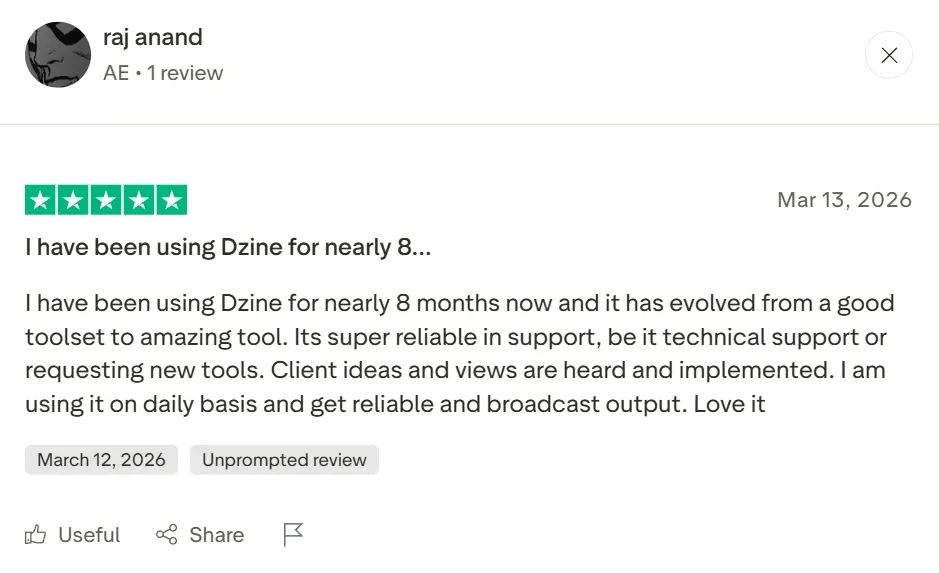
On platforms like G2 and Product Hunt, Dzine AI is praised by instructional designers for its 'intuitive' workflow. One verified user noted, 'Its super reliable in support... I am using it on a daily basis to get reliable broadcast output.' It is a top choice for those who value 'visual precision' over 'speed.'
However, the 'darker' side of user feedback reveals a significant 'creative wall.' Some users find that while the clips look beautiful, the tool is essentially a 'fragment generator.' It produces 4-second masterpieces, but 'stitching' them into a coherent 30-second marketing ad requires a lot of manual labor in external editors.
Furthermore, real-world users have reported 'credit anxiety.' As one user noted, 'You will throw away a lot of credits/money before you realize how things work.' Another mentioned being charged 90 after a trial ended, emphasizing that the 'learning curve' can be expensive.
This is where TikTV Agent redefines the category. Instead of forcing you to 'babysit' individual stylized clips or lose credits on failed tests, TikTV.AI functions as a true marketing video agent. It understands the 'context' of your entire brand, generating 100% original, publication-ready videos that flow naturally from the first second to the last. While Dzine focuses on the 'frame,' TikTV.AI crafts the 'film.'
Dzine AI vs OpenArt vs TikTV.AI: Feature Comparison
Feature Dzine AI OpenArt TikTV.AI Core Philosophy Precision-driven Workflow Model-driven Exploration Agent-driven Production Key Capability AI-Native Canvas & Structural Control Face/Style Fine-tuning & Model Hub TikTV Agent Video Features High-consistency V2V (Style Transfer) Basic I2V & Frame Animation Multi-model T2V, I2V, Viral Cloning Agent Functionality Manual editing tools (No Agent) Explorative prompting (No Agent) Autonomous Agent (Full Pipeline) Automation Level Semi-automatic (Editor-centric) Manual (Prompt-centric) Fully-automatic (Conversation-centric)
1. AI视频风格转换
Dzine AI 的独特之处在于其“风格转换”引擎,该引擎可以说是目前市场上最稳定的。用户无需担心出现“抖动”的 AI 伪影,而是可以将原始的手机录像重新制作成 3D 动画、黏土动画或赛博朋克美学风格。它让创作者无需庞大的视觉特效团队即可制作出高预算的效果,因此深受音乐视频导演的喜爱。
2. 角色一致性锁定
AI 视频中最大的“痛点”是“脸部融化”问题。Dzine AI 通过专用的角色管理系统解决了这个问题。您可以“训练”或“锁定”特定角色的视觉 DNA,确保您的主角在多个场景中看起来完全一样。对于需要保持可识别性的系列内容创作者或品牌吉祥物来说,这是一个巨大的胜利。
3. 生成式填充和修补
与基础生成器不同,Dzine AI 提供“外科手术式”编辑。如果您有一个完美的视频,但讨厌演员穿的衬衫,您可以使用“修补”工具涂抹该区域并提示新的服装。这种程度的控制使该工具摆脱了“随机生成”并走向“有意设计”,为小的视觉错误节省了数小时昂贵的重拍时间。
4. 高保真AI 换脸
对于全球品牌而言,本地化是关键。Dzine AI 允许用户将人脸替换到现有视频模板中,并实现令人印象深刻的灯光和表情匹配。它旨在实现“真实”的整合,而不仅仅是“粘贴”照片。此功能对于需要为不同区域的营销活动更换代言人的网红营销机构尤其有用。
5. 基于画布的图像外绘
许多创作者都为“形状不合适”的素材而苦恼。Dzine AI 的无限画布允许您“外绘”,有效地想象原始照片或视频框架之外的内容。它可以将紧凑的方形镜头变成广阔的风景,为 TikTok 和Instagram Reels 等平台上的文本叠加提供必要的“安全区域”。
6. 背景移除器
在视频中移除和替换背景通常需要复杂的绿幕设置。Dzine AI 使用先进的动画逐帧技术 AI 来即时将主体与背景分离。分离后,您可以将主体放入全新的“AI 生成”环境中,让在车库中拍摄的产品看起来像是拍摄于豪华顶层公寓。
7. 草图变实物
Dzine AI 弥合了“概念”和“最终资产”之间的差距。设计师可以上传产品的粗略草图或场景,AI 将解释这些线条以创建逼真的渲染。这种“引导式”生成对于工业设计师和建筑师来说更加可靠,他们有特定的愿景,而简单的文本提示无法准确描述。
8. 多模型逻辑集成
Dzine AI 的运作方式是“白盒”工作流,而非神秘机器。它将Flux和 SDXL 等各种 AI 架构的优点结合在“画布 + 图层”逻辑中。这允许用户在画布上设置视觉基线,然后再将其应用于视频流,确保输出符合特定的艺术标准,而不是随机猜测。
Dzine AI 的核心理念是,人工智能应该是设计师的“副驾驶”,而不仅仅是一个“黑匣子”。
如今,它以“以设计为中心的 AI 工作区”的独特定位而存在。它吸引了那些觉得Runway太复杂、 Midjourney太“不受控”的人。它是专业美学与用户友好型自动化之间的中间地带,特别专注于“结构保留”和“精确重制”。
创意机构和插画师:非常适合需要保持严格“艺术指导”的团队。角色锁定和风格转换功能使机构能够交付一致的视觉宣传活动,而这些活动看起来不像“通用人工智能”生成的。
社交媒体内容创作者:非常适合Instagram上追求“美感”的创作者,他们希望将普通的视频博客素材转化为风格化的、适合“病毒式传播”的艺术作品,或高质量的“Face Swap”恶搞视频。
电子商务和 UI 设计师:用于创建“动态模型”。设计师使用草图转图像和外绘功能为产品构建沉浸式环境,而无需 3D 渲染套件。
Dzine AI vs OpenArt vs TikTV AI:功能对比
为什么创作者正在升级到TikTV AI
视频智能体优势
TikTV 智能体了解营销技巧和叙事流程,可提供完整的、可立即发布并推动销售的视频。
将静态幻灯片转换为视频
使用 TikTV AI 的PPT 视频制作器,将复杂的幻灯片或简报转换为高保真视频演示文稿,非常适合教程、推介或教育。
一键式病毒式工作流
凭借 100 多个专业用例,您可以复制全球病毒式视频趋势,或在几秒钟内创建UGC 风格的视频。
常见问题解答
Dzine AI 最适合用于什么?
Dzine AI 主要用于短视频剪辑中的“风格转换”和“角色一致性”。对于希望将现有素材转换为特定艺术风格(如动漫或 3D 渲染)并保持逐帧稳定性的设计师来说,它是一款备受青睐的工具。
Dzine AI 好用吗?
它是一个强大的视觉精度工具,但要做好经历“试错”阶段的准备。许多用户发现,在制作出可用的素材之前,他们会“浪费很多积分”来学习系统的工作原理。
Dzine AI 的主要用途是什么?
Dzine AI 是一款集图像和视频于一体的编辑器。它支持 120 多种效果,并允许用户在不同代次之间“锁定”特定的设计元素,使其成为比随机 AI 生成器更具“白盒”性质的替代品。
Dzine AI 支持长视频吗?
虽然您可以手动拼接剪辑,但 Dzine AI 针对短片、高风格化内容进行了优化。使用TikTV AI这样的基于智能体的工具,生成 60 秒连贯的营销故事要简单得多。
Can Dzine可以根据网址生成视频吗?
不,Dzine 专注于“视觉到视觉”的转换。对于“URL 到视频”或“PDF 到视频”的工作流程,您应该使用TikTV AI。