Kling 1.6
Kling AI released its latest 1.6 model on Dec 19, 2024. The new model boasts a remarkable 195% improvement in image-to-video generation capabilities compared to Kling 1.5, with a better understanding of prompts and enhanced physics and visual effects, setting a new benchmark in AI video creation. Try Kling 1.6 for Free below!
Key Features
Improved prompt adherence : Adheres to user instructions more precisely.
Upgraded motion dynamics : Provides more natural movements and facial expressions.
Enhanced image to video quality : Generates super-realistic and smooth outputs.
Dual mode approach : Supports Standard mode & Professional mode.
Improved Prompt Adherence
Kling 1.6 has a stronger, more intelligent understanding of user prompts and is capable of delivering more fitting responses to each prompt, particularly regarding motion, camera angles and pans, sequential movements, and so on. This ensures more consistent, dynamic results aligned with the user's prompt and expectations.
Sample:
Original image:
Prompt: Create an anime-style scene of a girl riding a broom in the sky with a black cat. Zoom in to a close-up of the girl's face as she looks ahead with curiosity.
Generated Clip:
Upgraded Motion Dynamics
Kling 1.6 can now deliver the most realistic movements and lifelike facial expressions in videos involving human subjects or characters. From jumping to frowning, making hand gestures, or simply moving the head up and down, every single motion is more fluid and authentic than Kling 1.5, almost impossible to tell apart from the real thing.
Sample:
Original image:
Prompt: A Kung Fu master throws a punch, and the air behind him swirls into the shape of a dragon.
Generated Clip:
Enhanced Image-to-Video Quality
With more dynamic and comprehensive color rendering, more detailed visual aesthetics, more realistic lighting, and shadows, plus improved consistency in style and theming throughout, Kling 1.6 delivers best-in-class video quality. Each video looks and feels that much more refined and perfectly crafted, with beautiful and impactful visuals across the board.
Sample:
Original image:
Prompt: A mechanical wolf rises slowly, spreading its limbs smoothly. The camera moves upward as its blue eyes narrow slightly. In the background, neon lights flicker, creating a mysterious futuristic atmosphere.
Generated Clip:
Dual Model Supported
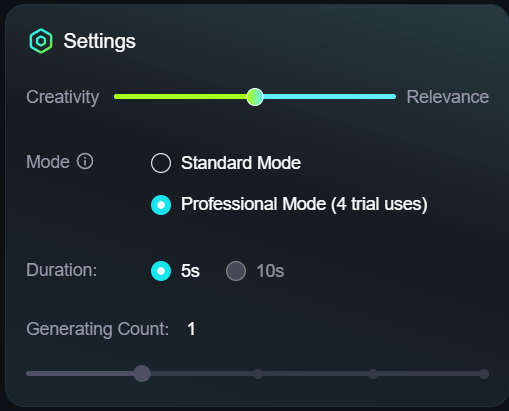
Kling 1.6 offers two distinct modes for users. There's the Standard mode for quickly and easily making AI videos. Then, there's the Professional mode, offering advanced customization options for higher-quality video production, tailored for more creative and experienced users to experiment with.
No Extra Costs Needed
Notably, all these impressive upgrades and new features in Kling 1.6 come at no additional cost to users, making it an even more attractive option for both new and existing users of the platform.
Kling 1.0 vs Kling 1.5 vs Kling 1.6
Kling 1.6 significantly enhances video generation compared to Kling 1.0 and Kling 1.5, providing users with improved performance and quality.
However, it is important to note that certain features for image-to-video creation, such as Start/End Frame, Motion Brush, and Camera Movement, are currently not available in Kling 1.6. Nevertheless, the platform indicates that these features are on the way.
(Last updated on Dec 25th, 2024)

How to Use Kling 1.6 on TikTV AI
Select the Kling 1.6 Model
Go to the TikTV AI image to video generator and choose the Kling 1.6 model.
Input Your Image and Prompt
Upload your image, enter your text prompt, and select other video options.
Create Video
Click Create to start the video generation process.
Kling 1.6 Video Reviews
Other Reviews on X
👀👌🏽👏🏾 GenAI capabilities are vast! This video is generated from Kling 1.6. Incredible quality and precision. 📹 pabloprompt & hugojido | IG #GenAI #AI #aiart #klingai #Tech #IoT #aifood #Foodie #TechNews #viral #ViralVideos pic.twitter.com/dgLjMbUr4I — Catherine Adenle (@CatherineAdenle) January 19, 2025
👀👌🏽👏🏾 GenAI capabilities are vast! This video is generated from Kling 1.6. Incredible quality and precision. 📹 pabloprompt & hugojido | IG #GenAI #AI #aiart #klingai #Tech #IoT #aifood #Foodie #TechNews #viral #ViralVideos pic.twitter.com/dgLjMbUr4I
I just tried Kling AI 1.6 and it's really impressive! @Kling_ai The video quality is incredible, with super realistic animations and smooth transitions. This is definitely a big step forward in AI video creation! #KlingAI #AI pic.twitter.com/HCOG2z57pO — Artificial Intelligence (@cloudbooklet) February 4, 2025
I just tried Kling AI 1.6 and it's really impressive! @Kling_ai The video quality is incredible, with super realistic animations and smooth transitions. This is definitely a big step forward in AI video creation! #KlingAI #AI pic.twitter.com/HCOG2z57pO
I tried to see how Kling v1.6 would handle the trolley problem.But it just backed away slowly. pic.twitter.com/EMIHsbTykZ — fofr (@fofrAI) January 7, 2025
I tried to see how Kling v1.6 would handle the trolley problem.But it just backed away slowly. pic.twitter.com/EMIHsbTykZ
More Articles About Kling 1.6
Delve into additional articles on Kling 1.6 to better understand this AI video model!
FAQs
What is Kling 1.6?
Kling 1.6 is the latest iteration of Kuaishou's AI video generation platform, Kling AI. With a remarkable 195% improvement in image-to-video generation capabilities over its predecessor, Kling 1.6 enhances prompt adherence, motion dynamics, and visual quality, establishing a new standard in the field of AI video creation.
How does Kling 1.6 compare to 1.5?
Kling 1.6 is a huge upgrade from Kling 1.5, boasting a 195% boost in performance. This version enhances video quality by providing sharper visuals and more consistent outputs, which makes it easier for creators to produce high-quality content. One of the cool features of Kling 1.6 is that it understands user instructions better, so the AI can follow your prompts more accurately. Plus, it has two modes—Standard and Professional—giving you the freedom to pick how much you want to customize your projects.
How to access Kling 1.6 for free?
You can access Kling 1.6 for free by visiting its official website. Alternatively, you can try it here at TikTV AI—the ultimate all-in-one AI video generator. TikTV AI gives you access to leading AI video generators on the market all in one place, making it easy to explore and use Kling 1.6 along with other top tools like Runway, Luma AI, Sora, and more.
Is Kling 1.6 more expensive?
Kling 1.6 maintains the same pricing as previous versions. Professional Mode (1080p) costs 35 Credits for a 5-second video and 70 Credits for a 10-second video, while Standard Mode (720p) costs 20 Credits for 5 seconds and 40 Credits for 10 seconds. Users can enjoy the upgraded features, including improved prompt adherence and enhanced image-to-video quality, at no additional cost.
Try Kling 1.6 for Free on TikTV AI!
Unlock all the powerful features of Kling 1.6 for free at TikTV AI now.