Google Veo 3 AI Video Generator
Announced at the Google I/O 2025 conference in May 2025, Google Veo 3 is a state-of-the-art AI video model capable of generating high-quality videos with realistic and natural audio, building upon its predecessor Veo 2 to achieve a significant leap in video quality. Try Veo 3 in TikTV AI video generator for free!
Key Features of Veo 3
Native Audio Generation: Create and integrate audio into the videos it produces
Produce Viral-ready Content: Create entertaining “fake news” videos or time-travel clips that help you earn likes
Advanced Prompt Understanding: Interpret complex prompts with high accuracy
Reference to Video and Consistent Characters: Create character consistent videos based on references
Accurate Style Control: Control the artistic style based on reference images
Camera Controls: Create videos with specific camera movements
Native Audio Generation
Veo 3 can create and integrate audio directly into the videos it produces, including sound effects, ambient noises, and character dialogue with synchronized lip-syncing. This makes the videos more immersive and realistic, addressing a major limitation in previous AI video tools that lacked integrated sound.
Produce Viral-ready Content
Create scroll-stopping viral videos in minutes. Veo 3 lets you craft entertaining “fake news” and time-travel, historical videos, or even animal talking videos with perfect audio-visual sync and cinematic quality. Grab likes and shares effortlessly.
Advanced Prompt Understanding
Veo 3 can interpret complex, narrative-driven prompts with high accuracy. Users can describe detailed scenes, character actions, and story elements in everyday language, and the model translates these into cohesive video clips.
Reference to Video and Consistent Characters
Veo 3 supports reference-powered video generation, allowing users to provide images of characters, scenes, objects, or artistic styles as visual anchors for the AI. This ensures that characters and elements remain visually consistent across multiple clips or scenes.
Accurate Style Control
By using reference images or style prompts, Veo 3 lets creators control the artistic style of the video output. Whether you want a photorealistic look, a cartoonish animation, or a particular cinematic style, you can guide the AI’s rendering to match your vision by uploading a style reference image.
Camera Controls
Veo 3, especially integrated within Flow, offers advanced camera manipulation features. Users can specify camera movements such as pans, zooms, and angle changes. This enables filmmakers to craft cinematic shots with dynamic perspectives and smooth transitions, enhancing the storytelling impact.
First and Last Frames
Veo 3 can generate seamless video content between two uploaded frames. This ensures smooth transitions and continuity from the first to last frames of a sequence, which is essential for coherent storytelling.
Add and Remove Objects
Veo 3 includes powerful object manipulation capabilities. Users can add or erase objects within a video scene, and the AI understands the scale, shadows, and interactions of these objects with the environment. This means you can modify a generated video by inserting new props or removing unwanted elements while maintaining a natural, realistic look.
Flexible Motion Control
Veo 3 excels at producing realistic and consistent motion. It allows you to specify movements of the objects in your video, and they will move naturally and interact believably. You can use this to produce fluid character animation, and coherent movement of environmental elements like fabric or water.
Integration with Flow
Veo 3 works with Google’s new AI filmmaking tool called Flow, which enables users to create cinematic videos by specifying locations, shots, and styles. Flow combines Veo 3 with Imagen 4 and the Gemini AI model to streamline video production workflows.
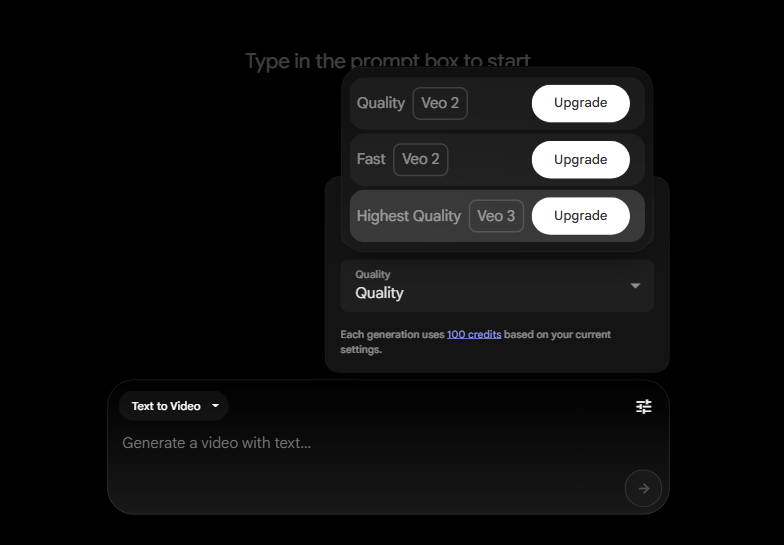
How to Use Google Veo 3 on TikTV AI
Here’s a simple rundown to help you dive into Veo 3 on TikTV AI:
Choose the Veo 3 Model
Go the TikTV AI image to video AI and select the Veo 3 model.
Enter Your Prompt
Upload your image and if needed, enter a prompt, then adjust the video settings.
Save Your Video
YouTube Videos About Veo 3
Reddit Posts About Veo 3
X Posts About Veo 3
1/ Veo 3 launched today! An extraordinary feat from the team to put all the pieces together to create our SOTA audio-video generation model. It’s an incredible tool that unleashes an unparalleled level of creativity and control in the hands of our users. Veo 3 has an uncanny… pic.twitter.com/lZ810Sr93R — Dumitru Erhan (@doomie) May 20, 2025
1/ Veo 3 launched today! An extraordinary feat from the team to put all the pieces together to create our SOTA audio-video generation model. It’s an incredible tool that unleashes an unparalleled level of creativity and control in the hands of our users. Veo 3 has an uncanny… pic.twitter.com/lZ810Sr93R
Google Launches Veo 3, an AI Video Generator That Incorporates Audio https://t.co/C4XBb9gyDC — Slashdot (@slashdot) May 20, 2025
Google Launches Veo 3, an AI Video Generator That Incorporates Audio https://t.co/C4XBb9gyDC
Veo 3 can generate videos — and soundtracks to go along with them | TechCrunch https://t.co/1g8APq2Uhj — TechCrunch (@TechCrunch) May 20, 2025
Veo 3 can generate videos — and soundtracks to go along with them | TechCrunch https://t.co/1g8APq2Uhj
FAQs
What is Google Veo 3?
Veo 3 is Google DeepMind's latest AI video generation model that can create high-quality videos from text or image prompts, with enhanced character consistency, style and camera control. Read our review of Veo 3 to know our personal experience with this model.
How does Veo 3 differ from its predecessor Veo 2?
Unlike Veo 2, Veo 3 generates native audio along with video, offers improved video quality with realistic physics, better lip-syncing, and enhanced understanding of complex narrative prompts.
What platforms provide access to Veo 3?
You can now try Google Veo 3 model in TikTV AI for free. Since TikTV AI has integrated Veo 3, you can create videos from text prompts using TikTV AI text to video AI with the same Google model.
How does Google ensure ethical use of Veo 3-generated content?
All Veo 3 videos include invisible SynthID watermarks that identify the content as AI-generated, helping combat misinformation and promote transparency.
Get Started with Google Veo 3 on TikTV AI Now!